Banner Economy
Banners are the server's primary resource — used to claim land and recruit new members.
Production
Each dynasty has a stockpile of banners they can craft. This stockpile increases automatically over time. To utilize your stockpile, simply craft a white banner using the custom recipe. This white banner will allow you to recruit a new player (see: Recruitment), or claim more territory.
| House Type | Production Rate |
|---|---|
| Dynasty | 5 banners/day |
| Cadet house | 3 banners/day |
| Cadet penalty | −2 banners/day per split |
Production accumulates in real time, even when you're offline. The stockpile caps at 30 banners.
Crafting Banners
All vanilla banner recipes are removed. The only way to get a physical banner is:
- Craft white banners: 1 Stick + 3 Emerald Blocks + 3 Emeralds → 1 White Banner. Use this to recruit.
- Dye them: 1 White Banner + 1 Dye → 1 Coloured Banner. Use this to claim.
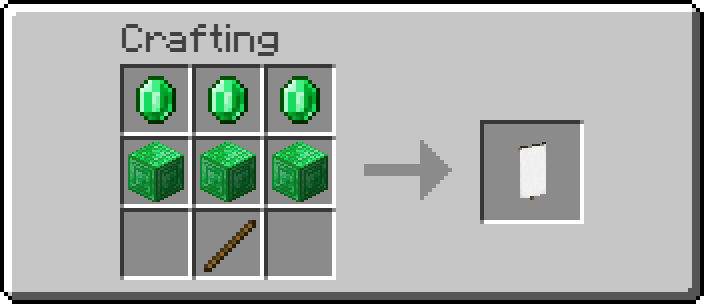
To craft from your house's stockpile, you must:
- Be the leader or a lord of your dynasty
- Have banners available in the stockpile
Spending Banners
- Claiming land — placing a dyed banner claims a chunk (see: Land Claims)
- Recruiting — white banners are used to invite new players (see: Recruitment)
- Trade — banners can be traded between players
Chat
AshenReach has a multi-channel communication system with 4 main channels.
Switch between channels with /chat <channel>:
| Channel | Command | Who Hears You | Tag |
|---|---|---|---|
| Global | /chat far | Everyone online | None |
| Dynasty | /chat dynasty | Your dynasty only | [Dynasty] |
| House | /chat house | Your entire founding lineage | [House] |
| Near | /chat near | Players within 100 blocks | [Near] |
The default channel is global.
Player Names
Player names appear coloured by their house's dye colour. Hover over any name to see a tooltip with:
- Dynasty name
- House name
- Rank — Leader (gold), Lord (dark green), or Member (white)
Private Messages
/msg <player>Send a private message/tellSame as /msg/wSame as /msg/replyor/rReply to whoever last messaged you
Commands Reference
Every command is available under its plugin's base command. The aliases below are the recommended day-to-day usage.
Plugin-Namespaced Commands
| Base Command | Subcommand | Description |
|---|---|---|
/ashenreachchat | chat <type> | Switch chat channel |
/ashenreachchat | msg <player> <message> | Send a private message |
/ashenreachchat | reply <message> | Reply to last message |
/ashenreachwhitelist | — | Check whitelist status |
Dynasty & Claims
| Command | Aliases | Description |
|---|---|---|
/dynasty | /d, /house, /leader, /dleader | Show your house info, rank, members, chunks, banner production |
/dynasty transfer <player> | Start a leadership transfer | |
/dynasty confirm <player> | Confirm a leadership transfer | |
/dynasty promote <player> | Promote a member to lord | |
/dynasty demote <player> | Demote a lord to member |
Recruitment
| Command | Aliases | Description |
|---|---|---|
/accept | Accept a recruitment invitation | |
/decline | Decline a recruitment invitation | |
/recruit | — | Show recruitment help |
/whitelist | /wl | Check whitelist status |
Chat
| Command | Aliases | Description |
|---|---|---|
/chat global | /ch, /channel | Switch to global chat (everyone) |
/chat house | Switch to house chat (your dynasty only) | |
/chat dynasty | Switch to dynasty chat (founding lineage + cadets) | |
/chat near | Switch to local chat (100-block radius) | |
/msg <player> <message> | /tell, /w, /whisper | Send a private message |
/reply <message> | /r | Reply to the last person who messaged you |
Aliases Quick Reference
| Alias | Full Command |
|---|---|
/d or /house | /dynasty |
/leader or /dleader | /dynasty |
/ra | /recruitadmin |
/wl | /whitelist |
/ch or /channel | /chat |
/tell, /w, /whisper | /msg |
/r | /reply |
/arc or /asr | /ashenreach or /ashenreachcore |
Disguise
Wearing leather armour gives you special buffs. Each piece has a different effect.
| Armour Piece | Effect |
|---|---|
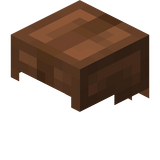 Helmet Helmet | Your nametag is hidden |
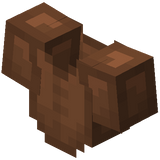 Chestplate Chestplate | You become invisible |
 Leggings Leggings | You get a disguised skin; your skin changes |
 Boots Boots | You get an alias; your identity is hidden on the tab list |
Aliases
When disguised (wearing leather boots), you're assigned one of these aliases:
The alias replaces your real name in chat and on the tab list.
Invisibility
With a leather chestplate equipped, you receive the invisibility potion effect.
Mix and Match
You don't need the full set. Each piece works independently:
- Helmet only — your nametag is hidden, but your skin is still visible.
- Chestplate only — invisible player, but still obvious on the tab menu.
Detection
There's no counter-measure built in. If you suspect someone is disguised, look for:
- A name you don't recognise in chat or tab
- A player wearing visibly coloured leather armour
- Particles or movement that seem off
Dynasties
Dynasties (also called houses) are the core social unit of AshenReach. Every player belongs to a dynasty.
Founding Houses
There are exactly 12 founding houses. Each founding house starts with a blank banner in its unique colour. Founding slots are assigned by application, not race-to-claim.
Cadet Houses
A dynasty can split when one of its members recruits 5 or more people into their personal downline. This creates a cadet house — a new dynasty that's a child of the original. Cadet banners add one new pattern layer to the parent's banner.
Effects of a cadet split:
- The parent house permanently loses 4 banners/day (floor of 1).
- The cadet starts with 8 banners/day.
- The founder's downline resets to zero.
Cadet branches can themselves spawn further cadets.
Dynasty Ranks
| Rank | Privileges |
|---|---|
| Leader | Full control. Transfers leadership, promotes/demotes lords. |
| Lord | Can craft banners from stockpile. Appointed by the leader. |
| Member | Default rank. Build in claimed territory, use containers, recruit new players. |
Run /dynasty to check your rank.
Leaving a Dynasty
You can leave your current house by getting invited to another one. Your recruitment downline stays with your old house and cadet-split progress resets. This is the primary check on bad leadership.
Viewing Dynasty Info
/dynasty— your own house info, role, members, chunks, production- Hover over a player's name in chat to see their house and rank
FAQ
Frequently asked questions about Ashenreach.
How do I join the server?
You need an invitation from an existing player. They right-click you with a white banner, and you run /accept. There's no other way in. (See Getting Started)
How do I start my own house?
You can't create a brand new founding house — there are only 12 slots, assigned by application. But you can split off as a cadet house once you've recruited 5 people under you. (See Dynasties)
How do I claim land?
Place a banner of your dynasty's colour on the ground. The chunk becomes yours. It must be adjacent to existing claims. (See Land Claims)
Why can't I craft banners?
All vanilla banner recipes are removed. Banners produce automatically into your house's stockpile. Only leaders and lords can craft from stockpile. (See Banner Economy)
Why am I not healing / regenerating health?
Stand near a lit campfire with no armour equipped. You'll heal HP per second. Each campfire gives 10 HP of healing before going out. (See Healing)
How do I hide my identity?
Wear leather armour. Helmet hides your nametag, chestplate makes you invisible, leggings change your skin, boots give you an alias. (See Disguise)
How do I talk only to my house?
Use /chat house. Switch back with /chat global. (See Chat)
Can I leave my dynasty?
Yes. Use /dynasty leave, then get invited by another house and /accept.
Can I overthrow my leader?
No. There is no voting or coup mechanic. If you don't like your leader, leave and take your recruiting potential elsewhere. Attrition is the check on bad leadership.
What's the point of recruiting?
Every player you recruit goes into your downline. At 5 downline you can form your own cadet house. Bigger downline = more political influence. (See Recruitment)
What happens if my house runs out of banner stockpile?
Production continues up to the 30-banner cap. If at zero, you can't claim land or recruit until more accumulate. (See Banner Economy)
How do I check my house's stats?
Run /dynasty — shows role, member count, claimed chunks, parent house, and production status.
Can I trade banners with other houses?
Yes. Banners are physical items you can give, trade, or sell to other players.
Getting Started
How to join Ashenreach and your first steps once you're in.
Joining the Server
When you first join AshenReach, you will be stuck in adventure mode. You can't begin to play without an invitation from a patron.
To get an invitation from a patron:
- An existing player holds a white banner and right-clicks you.
- A chat prompt appears — run
/acceptto join their dynasty, or/declineto refuse. - Once you accept, you're a full member. You can now log in freely.
To find a patron:
- You can explore around the server for players looking to recruit.
- Alternatively, look for recruiters in the community Discord. If you don't know anyone on the server, that's okay.
Your First Minutes
You'll spawn as a Member of whatever dynasty invited you. You can now begin your journey on AshenReach.
First Steps
- Check your house — run
/dynastyto see your house's name, your role, member count, territory size, and banner production. - Talk to your house — use
/chat houseto speak only to your dynasty. - Learn the land — walk around to see territory borders and explore the extents of AshenReach.
- Begin helping your house — help build infrastructure, grind for loot, or whatever else is needed.
Quick Tips
- Run
/dynastyoften to check your house's banner stockpile. - Don't wander into other dynasties' claimed territory without permission — they may be hostile!
- Campfires heal you if you take off your armour. (See Healing)
- Wear leather armour to hide your identity. (See Disguise)
Healing
This server features UHC Healing — there is no natural health regeneration.
This means fights will not be drawn out and can end decisively, and decisions while exploring must be made consciously. To compensate, campfires can be used for healing.
How It Works
- Find or place a campfire and light it with Flint and Steel.
- Take off all armour (helmet, chestplate, leggings, boots).
- Stand within 3 blocks of the lit campfire.
- You will begin to heal HP.
Each campfire provides 16 HP (8 hearts) of total healing before it extinguishes. Relight with Flint and Steel to use it again.
Why This Exists
- Force players to prepare before venturing out
- Make camps and forward bases valuable
- Give players a reason to build infrastructure in their territory
- Give an advantage to defenders who control their own turf
Tips
- Place campfires at strategic points in your territory.
- Carry Flint and Steel to relight campfires you find in the wild.
- Remove your armour before standing near a campfire.
Land Claims
Territory is claimed and controlled through banners.
Claiming a Chunk
- Hold a banner of your dynasty's colour.
- Right-click to place it on the ground.
- The chunk is now claimed by your dynasty.
Requirements:
- A banner can only be placed by Dynasty Lords and Leaders.
- The banner must match your dynasty's colour and patterns.
- The chunk must be adjacent to an existing claim.
- Your house must have enough banner stockpile (see Banner Economy).
Protection
| Action | Lords? | Members? | Outsiders? |
|---|---|---|---|
| Build/break blocks | Yes | Yes | No |
| Open containers | Yes | Yes | No |
| Use buckets | Yes | Yes | No |
| Interact with entities | Yes | Yes | No |
| Craft Banners from Stockpile | Yes | No | No |
| Claim/Unclaim Chunks | Yes | No | No |
| PvP damage | Yes | Yes | Yes |
Unclaiming
Break the placed banner to release the chunk from your dynasty's control.
Territory Awareness
When you cross between chunks owned by different dynasties, a title appears with the house name and coloured particles burst around you.
Leadership
Every dynasty has one Leader (Head of House) and can have multiple Lords.
The Leader
The leader has full control of their house. They can:
- Transfer leadership to another member
- Promote members to lord
- Demote lords to member
- Craft banners from the house stockpile
- Kick players from the house
Transferring Leadership
/dynasty transfer <player>— starts the transfer process/dynasty confirm <player>— confirms and completes the transfer
Leadership transfers are immediate once confirmed.
What Happens if a Leader is Inactive?
There is no automatic timeout or vote-kick. If a leader goes inactive, create a ticket and an admin can handle it. If leadership is bad and you aren't happy, you have the option of leaving, or splitting from the house and creating a cadet house.
Lords
Lords can craft banners from the house stockpile and can claim and unclaim chunks.
/dynasty promote <player>Promotes a member to lord/dynasty demote <player>Demotes a lord to member
Recruitment
Every player on AshenReach is invited by someone else.
Steps for Inviting a Player
- Hold a white banner in your main hand.
- Right-click the uninitiated player.
- One white banner is consumed.
- The player receives a prompt to run
/acceptor/decline.
If they accept, they join your dynasty as a member and are added to your recruitment tree — you become their patron. The player can now freely interact with the world of Ashenreach.
Accepting an Invitation
/acceptJoins their dynasty, becomes whitelisted/declineRefuses the invitation, nothing changes
The Recruitment Tree
Every invitation creates a permanent record: who invited whom. This forms the recruitment tree — a family tree of every player on the server. The tree is visible in chat hover tooltips and via /dynasty commands.
Separation and Cadet Branches
Your house is everyone you recruited directly, plus everyone they recruited, and so on.
- 5 Descendants = you qualify to form a cadet house (see Dynasties)
- Losing members to other dynasties shrinks your cadet house
- Leaving a dynasty does not reset your Cadet House
Tips for Recruiters
- Recruit people you trust — they become part of your permanent lineage.
- The more people you bring in, the closer you get to founding your own cadet house.
- White banners cost stockpile to craft — recruit wisely.
- A big recruitment chain is political power, even before any house splits.